Before touching. We observe.
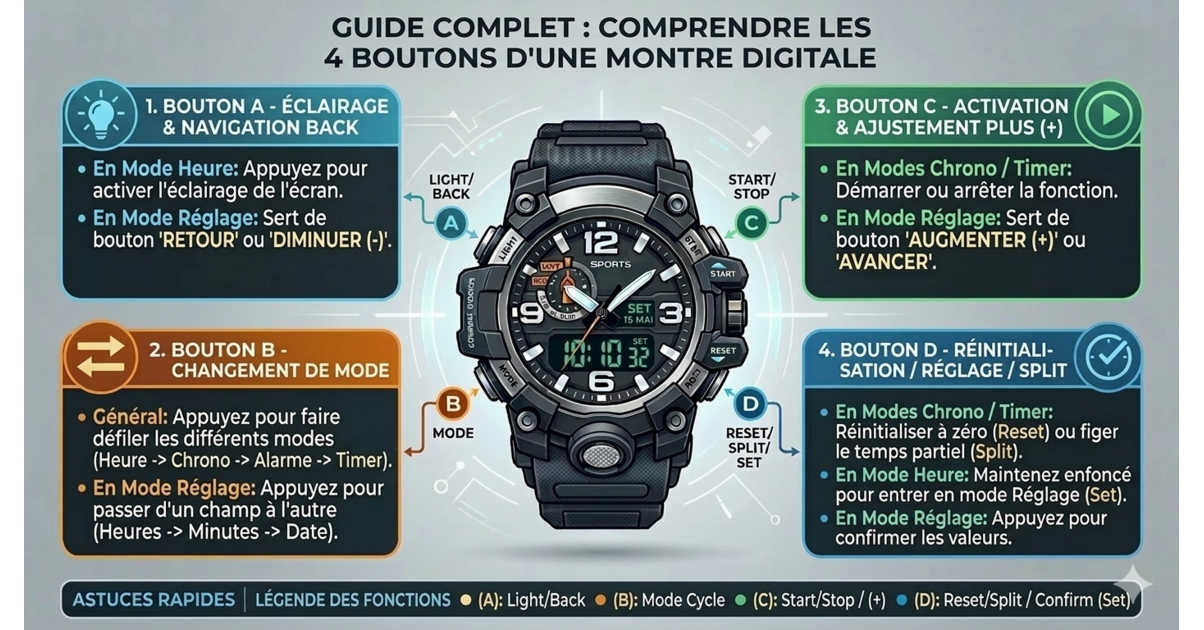
The majority of sports or LED models follow the same logic. Whether for adjusting a 4-button digital watch like the Casio MDV-107 or for an old watch forgotten in a drawer, the functions are similar.
| Button |
Most frequent role |
| Fashion |
Change display (time, date, alarm, stopwatch) |
| Set |
Enter setting mode |
| Start |
Increase a value / start the timer |
| Reset |
Reset / move to next field |
Obviously, the name may vary. Adjust instead of Set. Light instead of Reset. But the logic remains stable. These are often the best affordable watches that feature this type of interface. This is the basis of the user manual for a 4-button watch, even without paper.
What is the Mode button for?
Fashion is the guide.
Each press scrolls through the screens. Hour. Date. Alarm. Stopwatch. Sometimes a second spindle. If you are wondering how to use the buttons on a digital watchalways start with him.
A short press = display change. Nothing more. It doesn’t change anything. It just shows where you are. Practical to avoid disrupting the alarm when you wanted to touch the time.
The Set button to enter settings
Here we get down to business.
Set is used to enter the configuration. Long press. Three seconds usually. The numbers flash. This is the signal.
On some sports watches, Reset plays this role. Test a long hold. If it flashes, you’re in. This is the starting point for the initial configuration of a 4-button wristwatch.
Start and Reset: start or adjust
Start increases. Reset moves.
In setting mode, Start changes the flashing value. Hours, minutes, day. Reset moves to the next setting.
Out of adjustment, Start starts the stopwatch. Reset resets. Simple. There meaning of the buttons on a digital watch often relies on this dual function: action in normal mode, adjustment in setting mode.
Entering and exiting setting mode